

Release Note - November 2026
This update is to provide you with new ways to collaborate with other surveying firms.
Panel management
Panel Management
This module will support firms in collaborating and sharing jobs. Take instructions and offer them to other firms you work with. Let them progress the job and keep in the track at all stages.
Full details of how this huge new feature will be available soon.

Release Note - October 2026 - Small feature updates
This update is to provide a small number of minor feature updates ahead of our next big feature release
Various smaller refinements to make life easier
Live features
New email and SMS shortcodes:
- [Activate Customer Account URL Link]
- [Terms Document URL Link]
- [Direct Payment URL Link]
These shortcodes can be added to SMS as they produce a link only with no HTML styling (unlike the main shortcodes which generate buttons / html). You can also use them in the email templates and generate your own HTML styling around them.
Basic referral link – auto quoting
The basic link will now quote automatically if the job type and address are known but pricing is not confirmed to the referrer on submission. Pricing is provided to the referrer as normal if using the customer quote form referral link.
To be released shortly – date TBC:
Post booking questions (PQ) visible to referrers
This feature allows you to make the post booking questions visible to referral partners by job type so that they can submit answers on behalf of your customer.
Extra contacts on the basic referral form
This update will allow customers to share more than one contact for the job when completing the basic referral link (no changes to the main customer quote form referral link).
Referrer fees due table – include survey ID and property address
The referral fees due table will include the survey ID and property address to support the identification of jobs.
POST/Patch API
This will enable the posting of a lead with optional extras or adding extras to an existing job.
User settings
A new field is being added to the user profile for an individual calendar booking link, with a corresponding shortcode to pull the booking link for that user into email templates.
Webinar 23 - Sales Best Practice | Using Survey Booker features to optimise your sales process
Are you getting the most from your sales process?
Responding to a new enquiry is only the first step. But for many firms, once that initial email has been sent, there is little structure in place to manage what happens next.
Leads can be followed up inconsistently, communication can stop after the first contact, and opportunities can easily get forgotten or fall through the cracks.
In this webinar, we’ll look at the tools and features available within Survey Booker to help you create a more structured, consistent and efficient sales process.
Whether you’re starting with the basics or already have a process in place, we’ll explore how you can use templates, follow-ups, automations and pipeline views to help your team stay organised and make sure every lead gets the attention it deserves.
In this webinar, we’ll cover:
- Feeding leads into your sales process
- Initial contact options and improving your first response
- Following up with leads and customers
- Using tasks and automations to create a consistent process
- Admin and sales best practice
- Using pipeline and table views to prioritise and manage opportunities
- Sales tools that can provide greater structure, visibility and consistency
Many firms respond to a lead, send a standard template and hope that the initial contact results in a booking. If it doesn’t, that lead may never be followed up again.
This webinar will show you how a few simple processes and tools can help you build a more structured approach to managing leads – from the moment an enquiry comes in through to booking the job.
Key times:
Intro: 00:00
Adding leads: 04:20
Initial contact: 09:10
- Welcome emails
- Manual emails
- Notes
- and more
Create a sales pipeline: 30:37
- Postcode filters
- Table views
- Internal workflows
Follow up: 43:10
- External workflows
- Lead nurture
Reporting:
Webinar 22 - August 2026 Feature Release
Webinar 22 - August 2026 Feature Release
In this webinar, we will cover how to use your new features:
✅ Postcode filter
✅ Pricing management features
✅ Duplicate property flag and email sending rules
✅ Personalising user notifications
✅ Referrer mobile app
✅ Additional referrer features
✅ Q&A
Webinar 21: Using workflows to automate different tasks and comms
Webinar 21: Using workflows to automate different tasks and comms
In this webinar, we review how you can use workflows to automate internal tasks and/or external comms running through real examples on how to set them up.
Release Note - 8th August 2026
This update is to provide you with new ways to engage referral partners and manage your sales processes
Referrer mobile app
Postcode filter
Pricing management
Office 365 Connection
Duplicate flag
User notifications
Feature refinements
Referrer mobile app
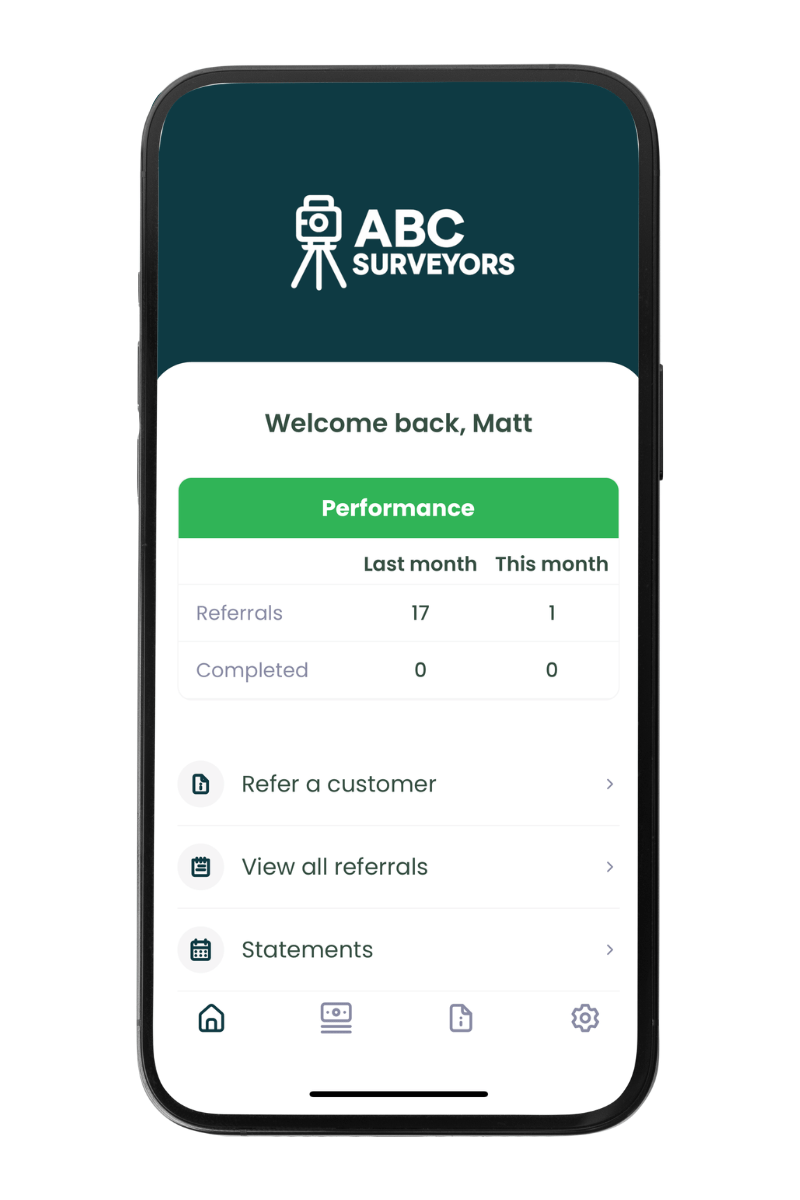
To support referrer engagement, we’re releasing our mobile app for referral partners.
Your referrers can download the app to:
- Share referrals on the go
- Track job updates on the move
- Access statements whenever they need
- Receive push notifications and email notifications
Designed to help your referral partners refer with ease and track updates in more ways to boost engagement and increase referral volumes.
Plans: Enterprise / bolt-on
Additional referrer features
Job notes: Referrers can now add notes to a job record via their portal and view notes that you’ve tagged them in.
What’s next section: the referrer portal now contains a “What’s next” section at the top of the page where you can set your own custom portal text to explain what is happening at each stage exactly like your customers have available in their portal.
Last month’s stats – the dashboard now shows both the current months referral stats and this months referral stats
Public report download link: a new page will be made available for each job to enable a report to be publicly downloaded. A user can enter their name and email address on this page to be sent a link to download the report. The input data can be viewed.
Plans: All
Postcode filter - target sales
We’re adding a new postcode filter to the quote/job table.
Postcode areas/districts can be selected to filter your data allowing you to focus your sales teams on the locations where your surveyor diaries are light.
This can be used with our table views feature, so you can set up table views for team members of priority focus areas.
Plans: All

Pricing management - track users discounting
This update introduces a number of updates:
- Fee suggestion: When changing job type, the system will check your pricing table for the fee saved. It will ask if you want to save this fee or edit this fee before saving.
- Price book reference: when a job is created, a note is added to the quote section showing what fee was saved and from which pricing table. This can be included in exports allowing you to report on how often the pricing table fee matches the final survey fee or where your team are discounting to win jobs. When changing job type, the fee will be updated to show the price for the relevant job type selected. This will be included in the GET API response.
This update is designed to make quoting easier and to track if customer purchases are at the correct value.
Plans: All

Permanent Office 365 Connection
Following this update, once users reconnect their email/calendar, the connection will remain in place until a user changes their password on Office 365 (which will invalidate the connection).
This will remove the need to reconnect every 90 days.
User’s connections will remain active until their current 90-day expiry is reached. On reconnecting, the connection will remain active using the new connection method.
Plans: All
Release update: this feature will be activated 1-2 weeks after the main release date, pending final testing and approval. We will update this page once this update is active.
Duplicate lead flag - update
We are adding a duplicate lead flag based on the lead having a similar property address.
This will enable you to check if the lead is the same as an existing one.
Email sending rules will also enable you to control if the welcome email should still be sent if the lead is flagged as a duplicate.
Plans: All
User notifications content
You can now edit the user notifications to change what information is included in each notification your team receives.
E.g. your new search received alert – choose what information is included in the email subject and body to suit the information your team needs.
This can be edited for every template so you can tailor the content you receive as well as what is sent to your customers!
Plans: All
Various smaller refinements to make life easier
Easier customer booking – when customers follow book now links (via emails or the quote page) to set a password, they will be instantly logged in, removing the need to login after setting a password and making booking a job or tracking updates even easier!
Billing contact address – when “other” is selected as the billing contact, a new exportable billing contact address field will be displayed.
Billing contact – can now be added to the quote table as a column
Property link – this field will be a clickable link both on the web and mobile apps
Post API – success response to include link to the direct payment page
Address lookup – a new address provider will be implemented. There will be no visible change here.
Email composer – pasting is allowed into the cc / bcc fields
Additional job contacts – previously additional job contacts weren’t able to make payments (only primary contacts) when logged in. We’ve updated the system to allow additional contacts to make payments via the portal too.
Post booking questions – when a user changes the answer to a parent question, any conditional questions will reset so that old data isn’t included in job sheets that are no longer relevant to the parent question
Mobile app updates
- Push notifications now take you to straight to the related job
- Elmhurst pop-up updated to support posting of jobs manually to Elmhurst
- Lead cost editable (inc on web app)
Irish address look up – the address finder is now enabled for Irish Eircodes
Webinar 20 - Using your new features from the March 2026 release
Webinar 20 - Using your new features - March 2026 release
In this webinar, we review the new features available on the most recent feature release:
✅ AI Email Composer – settings and using the composer
✅ Performance statistics and goal settings
✅ Elmhurst integration
✅ Referral partner updates
✅ A number of the smaller refinements
Webinar 19 - Security best practice to keep your business and online data secure
Webinar 19 - Security best practice to keep your business and online data secure
In this webinar, we discuss security principles and why they’re important, why security features exist (not just what exists), how Survey Booker helps you to remain secure, features we offer to support you and general tools you can use to keep your business and data safe.
✅ What are the security principles and why they matter
✅ How Survey Booker helps protect you
✅ Features on Survey Booker to boost your security (not all are outlined for security reasons)
✅ General tools you can use to help keep your business and team secure and aware
Release Note - March 28th 2026
This update is to provide you with new ways to customise your account and processes!
Email composer update
Performance stats
Referrer updates
Elmhurst integration
Feature refinements
AI Email composer update
As the first phase in our AI rollout, we are adding an AI email composer.
The composer can help write a new email based on your prompts or help write a response to an email reply.
This will be available on all plans with larger free allowances on higher plans.
This update is designed to help you write better emails, faster and is part of a number of planned AI updates over the coming months.
Plans: All (free token allowance subject to plan)
Performance stats
This feature provides an additional report page tab, where you can report on assigned users (leads), and account managers (referrers) to understand your team’s work levels from emails sent to notes added to tasks added and completed.
On higher plans, goals can also be set and reported against.
This feature is designed to help you delve into your team’s activity levels to see what is driving each user’s success and help support them in their roles further.
Plans: Enterprise
Referrer updates
We’ve made a range of updates to support working with referral partners:
- All referrer modules:
- Custom fields – add custom fields to referrer records and to your referrer table
- Lapsed timeframe – set your own lapsed timeframe instead of the default 30 days
- Custom referral link – set a link to your own referral link
- Activity log – this will now show changes to the referrer notification preferences
- Industry types – you can now set your own custom industry types
- Export – export the quote/jobs table from each referrer record
- Referral fee – partial refunds can be added
- Referrer Plus:
- Grouped data on referrer records (search notes, tasks, emails for all group records – branches and contacts – from the group record)
- Basic referral link – set if the address is required or not to submit a lead
- Custom statements – instead of using our standard statements, you can upload custom statements (name, date range and file) manually or via API
- API updates to create and edit referral partners
Elmhurst Integration
Using the new Elmhurst integration, you can create EPCs ready to be completed in Elmhurst on booking an appointment. The final EPC PDF can also be uploaded to the job automatically (Scottish market for retrieval due to legislative restrictions).
Plans: Advanced
Various smaller refinements to make life easier
Webhooks
- Additional fields added to all webhooks (full details to be shared in the webhooks guide post release)
- New webhooks:
- Cancelled
- Tentatively booked
- Quote rejected
- Inspection went ahead
- SMS Subscribe / SMS Unsubscribe
APIs
GET API – Various fields have been added:
- Show survey created by (manual leads)
- Show On Hold date
- Get User list
- Archived date
- Cancelled date
Patch API: update standard and custom fields via the patch API as well as customer details.
Timeline page
Key dates now include the archived date and cancelled date.
Optional extras will be listed in the title area at the top of the page.
Billing contact – a new option of “Other” with fields to record who it is.
Reschedule appointment – you can now set if notifications are sent to the customer, referrer and access contact to control all alerts.
Settings
On Hold: You can now add “On hold” reasons – when putting a job on hold you can select the reason to display on the job page. View guide.
Survey Hub:
- A new [Survey Type] shortcode has been added for customising your integration settings.
- Lender Name can be customised
- Alternative settings can be added by lead source to set different lender name, instructed by, lender ref
- A message can be displayed on accepting the job before sending to Survey Hub to prompt users to check any data before posting
- View guide
Quote/job export: you can now choose which custom fields are included in the quote/job table exports instead of all custom fields being included
Lead allocation:
- When auto archive is run, it will no longer include a record if it has an active task.
- Lowest lead count method – update so that once multiple users have the lowest count, each user is allocated leads in turn of who has waited the longest since last receiving an automatically allocated leads. Manually added leads are also ignored in line with the round robin process.
Workflows – task creation has been updated to operate based on working days instead of calendar days (E.g. due date in 3 days time, the task will create with a due date in 3 working days).
Other
User tags – super admin users can now clear down tags for any user (e.g. where a user has left the company)
Report writing feeds
- You can now delete the link to a job in a report-writing tool. This allows you to post a new job through. This is useful where you created a job but the report type now needs to be changed having viewed the property or if you’ve had a change in customer request.
- Jobs can be set up against multiple report writing tools where they are multi-document reports. This enables you to automate the creation of different document templates within a job (e.g. a Home Report)
- GoReport – when cloning, the job will automatically update / verify without needing the manual step
- Updating job data – on the report writing logo pop up, you can now update the data sent to the report writing tool if you change data on the Survey Booker record using the ‘refresh data’ button.
Tagged in note notification – this will now include the content of the note to save you needing to login to view it.
Bug fixes / refinements
Referrer – when editing, the industry is only required if set as required in your referrer settings (previously it was requiring the field to save edits to a referrer even if not a required field in your settings).
Skip payment: the wording has been updated to say “Do you want to skip payment” instead of “Do you want to pay later?”
Access dropdown – this has been updated to say “Customer” instead of “I am the access contact” on your view. It remains as I am the access contact in the customer portal.
Add/edit contact on job record – a contact can be added without a number or email. The job record has been updated so that a contact can be edited/saved without a name/number and when creating a contact via the timeline page (add/remove contact), this also only requires a name.
Document preview – this now will show previews for Spreadsheets and Word documents instead of PDFs.
Drop-in Sessions
What Are Our Drop-In Sessions?
Our monthly drop-in sessions are free, informal opportunities to get support with your account. There’s no need to book – simply join at any time and stay for as long as you like.
These sessions are ideal if you want to:
- Ask questions about processes you’d like to streamline
- Learn how to use specific features
- Explore what tools are available to help improve your workflows
- Get quick guidance or reassurance on anything you’re unsure about
You can join and leave whenever it suits you. Some people pop in with a quick question, while others stay longer to listen and learn from others.
The goal is simple: to help you get the most out of your account in a friendly, flexible way.
Our next dates and links to join:
🗓️ Wednesday, 22 July · 4:00 – 5:00pm: https://meet.google.com/gwj-vedz-dzy
🗓️ Thursday, 20 August · 4:00 – 5:00pm: https://meet.google.com/jus-nccs-dzc
🗓️ Wednesday, 16 September · 4:00 – 5:00pm: https://meet.google.com/cai-qznu-jxr
🗓️ Wednesday, 21 October · 4:00 – 5:00pm: https://meet.google.com/ggk-qdsc-vtt
🗓️ Wednesday, 18 November 2026 · 4:00 – 5:00pm: https://meet.google.com/pts-wdwm-zvo
🗓️ Wednesday, 16 December 2026 · 4:00 – 5:00pm: https://meet.google.com/qhr-inhn-bgh
Note: dates are subject to change. Please check back in advance.